Excel or Google Sheets file
Employer Change Planner for the Employment Rights Act
The main Employment Rights Act changes, the actions, and your staff dates. In one spreadsheet. A fill-in tracker: the dated list of changes, an action list with an owner and a do-by date for each item, and a sheet that works out six month dates for your staff.
Secure payment by Stripe. Card details never reach us. You get instant access to a private downloads page. At checkout you tick to confirm you want immediate access and understand you lose your 14 day right to cancel once you download or open any file. See the terms of sale.
Who it is for
Owner managers, office managers and HR leads in small employers in Great Britain who want everything in one place, with a name against each job.
Who it is not for
- Employers in Northern Ireland, which has separate employment law.
- Anyone looking for legal advice or ready-made legal documents. It is a planning tool.
What you get
- Dates sheet: every change with its date, status (in force, date set in regulations, expected, to confirm) and who it affects.
- Action tracker: over 30 actions drawn from our checklists. Set an owner and a do-by date, pick a status, and see progress at a glance. Overdue items turn red.
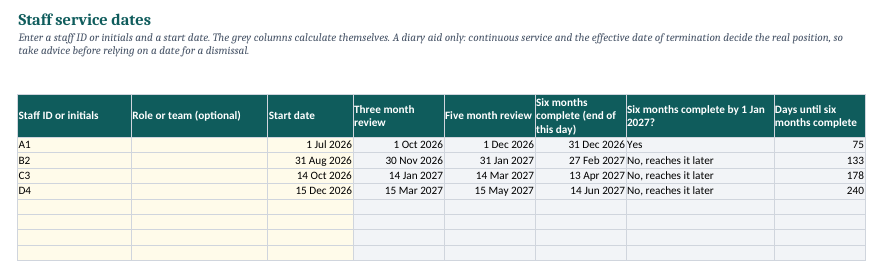
- Staff dates sheet: type a start date and it works out the three and five month reviews, the day six months of service is complete, and whether that falls on or before 1 January 2027. Space for 100 people.
- Harassment prevention log: a dated record of what you do, ahead of the 30 October 2026 duty.
- Contract change log: a dated record of changes you are considering, for the fire and rehire rules expected in January 2027.
- Version log, so you can see what changed each time we update it.
How it works
- Buy it. You are taken to a private downloads page and we email you the link.
- Download the file and open it in Excel or Google Sheets.
- Fill in the yellow cells: owners, dates and staff start dates.
- Come back to your downloads page for the latest version whenever dates change.
Questions
Do I need Excel?
No. It works in Excel and in Google Sheets (if you upload it to Google Drive, it is then held in your own Google account). It does not need macros.
Does it hold staff names?
Only what you type, in your own copy of the file. We never see it. We suggest staff IDs or initials rather than full names.
How do I get updates?
Your private downloads page always gives you the latest version for at least 12 months from purchase. If you sign up for the free updates, the monthly email tells you when something has changed.
Guides that go with it
- How to work out when an employee reaches six months of service
- How to keep a dated record of what you do to prevent sexual harassment
- How to run probation reviews before 1 January 2027
Get the free monthly updates
Free monthly updates on the Employment Rights Act, plus a note straight away when a date or status changes.
This product is general information to help you prepare. It is not legal advice, it does not create a solicitor and client relationship and it does not guarantee that you comply with the law. Dates can change: GOV.UK says all future dates remain subject to parliamentary processes. Great Britain only. Dateledger is independent and is not part of, or endorsed by, the UK Government, Acas or the Fair Work Agency.
Other tools and packs
- Manager Briefing Pack, £9: Owners and HR leads who need to brief line managers.
- Staff Dates Checker, £9: Employers who keep start dates in an HR or payroll system.
- Employer Pack, £15: Small employers who want to do the whole job once.