A web page that runs in your browser
Staff Dates Checker for the Employment Rights Act
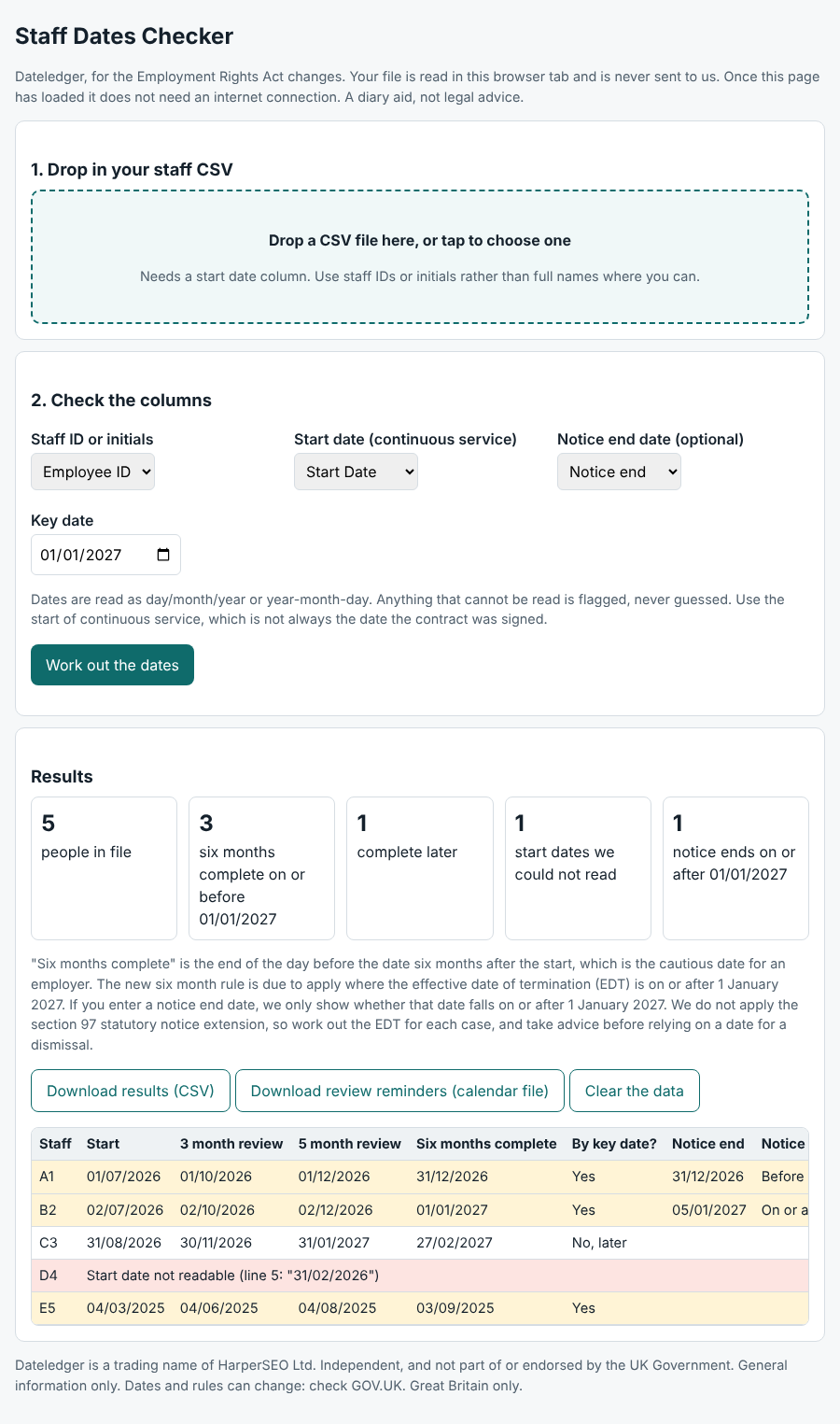
Drop in your staff export. See who reaches six months, and when. Export start dates from your HR or payroll system as a CSV and drop the file in. The checker works out review dates, flags whose six months of service is complete by 1 January 2027, and compares any notice end dates you add with 1 January 2027. Your file is read in your browser and never sent to us.
Secure payment by Stripe. Card details never reach us. You get instant access to a private downloads page. At checkout you tick to confirm you want immediate access and understand you lose your 14 day right to cancel once you download or open any file. See the terms of sale.
Who it is for
Employers with more than a handful of staff, whose start dates sit in an HR or payroll system, and who want the whole workforce checked in a minute instead of person by person.
Who it is not for
- Employers with only two or three staff, who can use the planner or a calendar.
- Anyone who wants us to hold or process their staff data. We deliberately do not.
What you get
- Works with any CSV file that has a start date column, with a column picker so you can point it at the right columns.
- Three and five month review dates for every person, the day six months is complete, and whose falls on or before 1 January 2027.
- Optional notice end dates: if you enter one, it shows whether that date falls on or after 1 January 2027. It does not apply the section 97 statutory notice extension, so work out the effective date of termination for each case.
- Download the results as a spreadsheet, or as a calendar file with review reminders.
- Your file is read in your browser and never sent to us. Clear the data removes the results from the page.
How it works
- Buy it and open your private downloads page.
- Open the checker and drop in your staff CSV.
- Check the column picker, then read the results.
- Download the spreadsheet or calendar file. Clear the data when you are done.
Questions
Where does my staff data go?
Nowhere. The checker runs entirely in your browser and, once the page has loaded, does not need an internet connection. We never receive the file. Please use staff IDs or initials rather than full names, and delete the export once you are done.
Which systems does it work with?
Any system that can export a CSV with a start date column. Dates are read as day, month, year, or as year-month-day. Anything it cannot read is flagged rather than guessed.
Is the result legal advice?
No. It is a diary aid. Continuous service and the effective date of termination decide the real position, so take advice before relying on a date for a dismissal.
Guides that go with it
- How to work out when an employee reaches six months of service
- How to get your staff start dates out of an HR or payroll system
- How to run probation reviews before 1 January 2027
Get the free monthly updates
Free monthly updates on the Employment Rights Act, plus a note straight away when a date or status changes.
This product is general information to help you prepare. It is not legal advice, it does not create a solicitor and client relationship and it does not guarantee that you comply with the law. Dates can change: GOV.UK says all future dates remain subject to parliamentary processes. Great Britain only. Dateledger is independent and is not part of, or endorsed by, the UK Government, Acas or the Fair Work Agency.
Other tools and packs
- Employer Change Planner, £3: Owners and office managers who want every change and action in one place.
- Manager Briefing Pack, £9: Owners and HR leads who need to brief line managers.
- Employer Pack, £15: Small employers who want to do the whole job once.